 gmCharts
Mesh Maker VR
Current players
0
24h peak
0
30 day peak
0
Release date
01/04/2017
About game
Mesh Maker VR is an intuitive, easy to use, and easy to learn VR 3d modeling tool based on vertices. Nearly zero learning curve. Just hop into VR and start making 3d models.
MMVR is a 100% open source MIT licensed product. Check us out on github:
MMVR UI is also 100% open source with an MIT license. Check it out too:
Urgent priority:
High priority:
MMVR is a 100% open source MIT licensed product. Check us out on github:
MMVR UI is also 100% open source with an MIT license. Check it out too:
Current Features / ChangeLog
- Save As - 5/16/2017
- User Interface (UI) for Load OBJ, including directory traversal - 4/28/2017
- Ability to change skybox from Settings (stars, blue sky, and sunset as the first three choices). - 4/1/2017
- Eye dropper tool (Tools -> Triangles -> Pick Color) - 3/28/2017
- Triangle multi-select mode - 3/24/2017
- Fill Tool (ability to color faces) - 3/23/2017
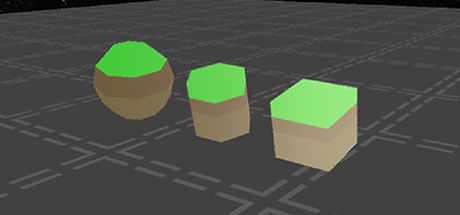
- Sphere Primitives - 3/6/2017
- Lock Reference Images - 3/3/2017 (allows placing vertices directly on reference image for easy extrusions)
- Cylinder Primitives - 2/28/2017
- Circle Primitives - 2/22/2017
- 3d Tracing Mode - 2/3/2017
- Box Select - 1/29/2017
- Box Primitives - 1/27/2017
- Selection Flip Normals - 1/27/2017
- Extrude Face - 1/26/2017
- Merge Vertices - 1/26/2017
- Plane Primitives - 1/25/2017
- Rotation Snapping - 1/25/2017
- Multiselect & Copy/Paste - 1/22/2017
- Reference Images - 1/16/2017 (top.png, bottom.png, left.png, right.png, front.png, back.png in same folder as executable)
- Alignment Tools - 1/16/2017
- Object scaling for easy work positioning - 1/19/2017
- Settings saved as JSON - 1/16/2017
- Ability to adjust snap spacing from Settings - 1/8/2017
- Wavefront OBJ Load/Save (no UI for load yet - loads "load.obj" on startup. Save has simple button in radial menu.)
- Vertex Create/Move/Delete
- Face Create/Delete/Flip
- Snapping for Vertex Create/Move
- Object rotation and movement for easy work positioning
- Teleporting for easy work positioning
Roadmap
Features will be implemented over time according to their priority. Urgent priority first, then High priority.Urgent priority:
- Extrude Along Normal button (locked extrusion axis)
- Hide snap 3d crosshair lines unless they hit something
- Make snap crosshair disappear when near Tool/Settings Panel "airspace"
- Edge extrusion
- Mirror/symmetry plane
High priority:
- Subdivide
- Proportional Editing Tool
Player Activity
Monthly stats
| Month | Avg players | Growth | Growth % | Peak |
|---|---|---|---|---|
About Mesh Maker VR stats
gmCharts tracks Mesh Maker VR Steam player activity, including current players, 24-hour peak, 30-day peak, recent trends, and aggregated Steam review data. Use this page to quickly compare player interest and review sentiment over time.
Steam reviews: Very Positive, 88% positive from 26 reviews.