 gmCharts
Ultimate Low Poly Pet
Текущие игроки
0
Пик за 24ч
0
Пик за 30 дней
1
Дата релиза
18.02.2020
Об игре
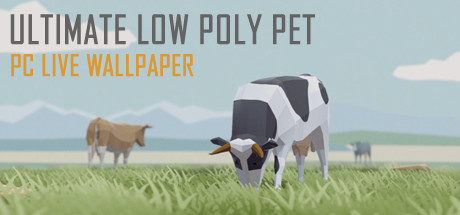
Ultimate Low Poly Pet is a clean and stylish interactive 3D live wallpaper that display cute low-poly pets on the desktop with animated backgrounds. You can control and interact with pets with your mouse.
A: 1. Make sure your Windows had enabled Aero
2. Adjust Windows System "System Properties>>Performance Options>>Visual Effects" to "Adjust for best appearance"
3. Please add UltimateLowPolyPet .exe and CoreHost.exe in App folder Path to your AntiVirus Software's Trust-White-List and Restart computer
Q: How to turn the audio off? or How to Mute?
A: Right click the tray icon and select menu item "wallpaper setting" ,click right side the third button "options" and checked the "Mute" option.
Q: How to remove Steam Hook?
A: Right click the UltimateLowPolyPet tray icon and select the menu item "Preferences..." ,Uncheck the "Enable Steam Support", Restart UltimateLowPolyPet.
Q: Can I use UltimateLowPolyPet with WallpaperEngine at the same time?
A: NO. Live wallpaper software is exclusive. So if they are used at the same time, they will cover each other.
Q: How to Exit/Shutdown UltimateLowPolyPet ?
A:1. You can exit UltimateLowPolyPet from tray icon menu "Exit" (Screen Bottom-Right corner).
2. if can not found the tray icon, please open the system TaskMgr to kill the processes "UltimateLowPolyPet .exe"
Features
- Support Workshop,One-Click download online themes
- Support Custom Theme,Provide multiple animals and backgrounds for you to choose, many editing options,colors, Intensity etc.
- Support Pause Mode - You can pause wallpaper when you need 100% power for your games.
- Optimization - reduced equipment requirements. Low CPU usage.
- Multi, wide, 4K screens support - You can choose one of the screens or extend the wallpaper to all screens. Works smooth at 4K.
- Support Taskbar Aero Blur or fully transparent (for Win10) .
- Support Windows 7/8/8.1/10
FAQ
Q: Why can't I see the desktop icon?A: 1. Make sure your Windows had enabled Aero
2. Adjust Windows System "System Properties>>Performance Options>>Visual Effects" to "Adjust for best appearance"
3. Please add UltimateLowPolyPet .exe and CoreHost.exe in App folder Path to your AntiVirus Software's Trust-White-List and Restart computer
Q: How to turn the audio off? or How to Mute?
A: Right click the tray icon and select menu item "wallpaper setting" ,click right side the third button "options" and checked the "Mute" option.
Q: How to remove Steam Hook?
A: Right click the UltimateLowPolyPet tray icon and select the menu item "Preferences..." ,Uncheck the "Enable Steam Support", Restart UltimateLowPolyPet.
Q: Can I use UltimateLowPolyPet with WallpaperEngine at the same time?
A: NO. Live wallpaper software is exclusive. So if they are used at the same time, they will cover each other.
Q: How to Exit/Shutdown UltimateLowPolyPet ?
A:1. You can exit UltimateLowPolyPet from tray icon menu "Exit" (Screen Bottom-Right corner).
2. if can not found the tray icon, please open the system TaskMgr to kill the processes "UltimateLowPolyPet .exe"
Активность игроков
Месячная статистика
| Месяц | Сред. игроки | Рост | Рост % | Пик |
|---|---|---|---|---|
О статистике Ultimate Low Poly Pet
gmCharts отслеживает активность игроков Ultimate Low Poly Pet в Steam, включая текущий онлайн, пик за 24 часа, пик за 30 дней, недавние тренды и агрегированные данные отзывов Steam. Эта страница помогает быстро оценить интерес игроков и тональность отзывов во времени.
Отзывы Steam: В основном положительные, 71% положительных из 35 отзывов.